


SonicWall.shop (formerly SonicWall-Sales.com) is operated by Sonictek Limited - an authorized SonicWall Platinum Partner with 20+ years experience

Latest News

02/02/2026
by Admin Admin

Latest blogs and updates from SonicWall-Sales.com

Upcoming Price Adjustments: TZ and NSa Firewalls

13/10/2026
by Admin Admin

SonicWall is raising prices on all TZ and NSa firewall hardware and bundles in both NOAM and EMEA, effective 9 November 2026. The reason given is that input costs have risen beyond what they can absorb.

Increases (same in NOAM and EMEA):

  • TZ bare hardware: 15%
  • NSa bare hardware: 18%
  • TZ bundles (hardware + EPSS/APSS/MPSS, 1 or 3 year): 5%
  • NSa bundles: 10%

Timing:

  • Up to 31 October 2026 (end of SonicWall’s fiscal quarter): deals and SPRs on these products must close by this date to get current pricing. Discount requests and SPRs will only be approved in exceptional circumstances.
  • 1–8 November: a freeze. You can’t create new quotes on affected products, and no SPRs will be approved.
  • From 9 November: new pricing applies.

Why should I consider upgrading my Gen 7 firewall to Gen 8

09/10/2026
by Admin Admin

Why would I look at upgrading from my Gen 7 firewall to a new Gen 8 firewall?

One of the primary reason is the small cost difference. If your current Gen 7 firewall is running the Advanced Protection Security Suite (APSS), the cost to renew APSS for 3 Years is similar to buying the Secure Upgrade (3 Years) for the replacement model e.g. TZ470 > TZ480.

We are also now seeing some additional security features and benefits with 8.x firmware over 7.x firmware, and will only increase. For example, as of October 2026 Gen 8 gets you these (that you don't get with Gen 7 firmware):  

  • Let's Encrypt Integration
  • Two-Factor Authentication for GVC
  • Indicator of Compromise (IoC) – Hash Detection

Gen 8 hardware may also give you benefits with connectivity. Using the TZ470/TZ480 again as examples, the TZ480 supports 5G SFP+ whereas the TZ470 only goes to 2.5G SFP+. General throughput has also increased.

Moving from Gen 7 to Gen 8 should also be relatively easy, since you can migrate the existing config onto the new appliance.

Model upgrades:

TZ270 > TZ280
TZ370 > TZ380
TZ470 > TZ480
TZ570 > TZ580
TZ670 > TZ680

NSa 2700 > NSa 2800
NSa 3700 > NSa 3800
NSa 4700 > NSa 4800

Hidden in Plain Sight: Closing the Encrypted Traffic Blind Spot with Cloud Secure Edge

08/10/2026
by Admin Admin

Closing the Encrypted Traffic Blind Spot with Cloud Secure Edge

What was once a trust signal for secure traffic has become a hiding place for threats. Recent studies show that attacks using encrypted traffic rose 24% year-over-year, with 95.54% of all new malware now delivered via HTTPS, often routed through trusted platforms to evade scrutiny. Attackers exploit this gap because firewalls and other perimeter defenses cannot see what is transmitted inside an encrypted session unless they are specifically configured to decrypt and inspect it.

Yet, despite being one of the most powerful attack-prevention controls available, adoption of traffic inspection remains low. This article examines why so few organizations enable TLS/SSL inspection, its associated risks, and how Cloud Secure Edge offers a simplified path to protection without the performance and complexity of trade-offs that have historically limited its adoption.

What Is TLS/SSL Inspection, and Why Does It Matter?

TLS (Transport Layer Security) encrypts most web traffic, ensuring data integrity during transmission between a device and a website or server. This is why browsers display a padlock icon and use “https” instead of “http.” Without TLS, sensitive data such as passwords, form entries, and page content is transmitted in plain text, meaning it would be easily read and exploited if the traffic is intercepted. Yet, while TLS protects data integrity and privacy, it does not verify the safety of the content. As a result, encryption can prevent firewalls that analyze only packet headers from detecting malicious activity, allowing malware to pass through trusted traffic. Additionally, attackers often obtain legitimate certificates for malicious domains, so HTTPS with a padlock icon does not guarantee security.[2]

TLS/SSL inspection addresses this vulnerability by decrypting, inspecting, and re-encrypting the session, sending it along to its destination only if no threats or vulnerabilities are found. 

Why TLS/SSL Inspection Rarely Gets Activated

Today, over 90% of internet traffic is now TLS-encrypted, creating a vast blind spot for firewalls without inspection enabled. However, like any security measure, inspection is only effective when used correctly - or at all. When a control causes operational complexity, disrupts users, degrades performance, or leaves coverage gaps, people tend to avoid it.

  • Certificate overhead. Enabling inspection requires generating or downloading a certificate, which IT must then distribute to every endpoint before traffic can be decrypted without triggering browser errors. This is often a manual process that requires significant time and resources.
  • Ongoing maintenance. When that certificate expires, the entire distribution process must be repeated across every device, creating a recurring administrative burden.
  • Performance impact. Decrypting and re-encrypting traffic in real time places additional load on the firewall, which can create a measurable drag on throughput, particularly on higher-volume networks.
  • Limited coverage. Because this protection is network-bound, it only applies to traffic passing through the firewall. Users working off-network or connected to guest Wi-Fi remain unprotected.

For most IT teams, the ongoing effort required to keep TLS/SSL inspection running outweighs the perceived benefit of turning it on in the first place.

How Cloud Secure Edge Closes the Gap

SonicWall Cloud Secure Edge is a cloud-delivered Security Service Edge (SSE) solution that provides zero-trust access to corporate resources and real-time internet security for every user and device, wherever they connect. The Secure Internet Access license builds on standard TLS inspection by removing its operational overhead and extending protection to users everywhere, not just those inside the corporate network. 

  • Follows the user, not the network. Because CSE is cloud-delivered rather than tied to a single firewall, inspection applies whether someone is on the corporate network, working remotely, or connected to guest Wi-Fi, closing the off-network gap.
  • No manual certificate distribution. Authentication tokens and certificates renew automatically in the background, so users are not dropped to a registration screen or prompted to re-enroll when a token renews.
  • Minimal re-enrollment. Re-enrollment is only required after long periods of inactivity, replacing the recurring, device-by-device redistribution that traditional TLS inspection requires.
  • Higher inspection capacity. File analysis runs at a 100MB limit, compared to 10MB on the firewall, allowing deeper malware analysis.
  • Scales with the workforce. Protection extends to every user and device without adding appliance-level throughput strain.

The Long-Term Payoff of TLS Inspection with Cloud Secure Edge

Closing the encrypted traffic gap does more than reduce risk. It changes what security teams can reasonably expect to deliver - and at what cost - once decryption no longer requires a trade-off between protection and performance.

  • Reduced risk of breach. With the majority of malware now delivered over HTTPS, enabling inspection directly addresses the channel attackers rely on most, rather than leaving it as an accepted blind spot.
  • Lower IT overhead. Removing manual certificate management and re-enrollment frees security teams from a recurring administrative task, allowing them to focus on higher-value work.
  • Consistent protection across a distributed workforce. As remote and hybrid work remain the norm, protection that follows the user rather than the network closes a coverage gap that traditional, appliance-bound inspection cannot.
  • Stronger compliance posture. Consistent visibility into encrypted traffic supports data protection and regulatory requirements that depend on demonstrable monitoring and control of sensitive information in transit.
  • Scalability without added infrastructure cost. Because inspection is cloud-delivered, organizations gain expanded protection without the appliance upgrades or throughput trade-offs typically required to scale firewall-based inspection.

Getting Started

TLS inspection is included in Cloud Secure Edge's Secure Internet Access Advanced, giving organizations a way to close the encrypted traffic gap without the certificate overhead, throughput trade-offs, or network limitations that have kept this control out of reach for most.

Learn more about Secure Internet Access: https://www.sonicwall.com/prod...

Why Does SonicWall Gen 8 Outperform the Competition?

07/10/2026
by Admin Admin

Raw Performance, Native Zero Trust, and Verifiable Total Cost of Ownership Set Gen 8 Apart From Competing Firewalls

The firewall landscape is more crowded than ever, with almost every vendor competing aggressively for the same budgets. So why are MSPs, MSSPs, and enterprise IT leaders increasingly choosing SonicWall Gen 8? The answer comes down to something refreshingly simple: it delivers more of what matters, without making customers pay for what does not.

The Gen 8 Moment: More Than a Hardware Refresh

When SonicWall unveiled its Gen 8 portfolio in August 2025, the industry took notice. Multiple new models span from the compact TZ280 to the high-performance NSa 6800, but the hardware is only part of the story. Gen 8 represents a fundamental rethinking of how a firewall should operate in a cloud-driven, hybrid-work world where threats are faster, traffic is encrypted, and IT teams are stretched thin.

This is not an incremental step on a product roadmap. It is a fully integrated security platform built for organizations that need enterprise-grade protection without enterprise-grade complexity or cost.

Raw Performance That Refuses to Compromise Security

One of the oldest frustrations in network security is the performance tax: enabling deep packet inspection, SSL/TLS decryption, or intrusion prevention, only to watch throughput collapse. SonicWall Gen 8 was engineered specifically to eliminate that trade-off.

Multi-core processors and multi-gigabit interfaces deliver high-throughput threat prevention even on entry-level models. NSa 4800 and higher push SFP port speeds to 10 Gbps. Encrypted traffic, which represents the vast majority of modern network flows, is inspected using hardware-accelerated RFDPI (Reassembly-Free Deep Packet Inspection) without degrading user experience. Full TLS 1.3 inspection comes standard, ensuring threats hiding inside encrypted tunnels do not slip through.

For MSPs managing clients across dozens of locations, this matters enormously. A firewall that throttles performance when security is fully enabled is not a secure firewall. It is a liability.

RTDMI: The Threat Intelligence Advantage

Not all threat prevention is created equal. Many competitors rely on signature-based detection, which is by definition reactive. SonicWall's patented Real-Time Deep Memory Inspection (RTDMI) technology takes a different approach: it inspects files directly in memory, in real time, identifying and blocking zero-day exploits and unknown malware before they execute.

This architecture allows Gen 8 firewalls to catch threats that never appear in any known signature database, sophisticated and evasive attacks that other firewalls simply miss. Combined with Capture ATP (Advanced Threat Protection), the result is a multi-layered detection engine that operates proactively rather than reactively.

When independent testing firm NSS Labs evaluated SonicWall, the platform achieved a 98.8% security effectiveness rating, within one percentage point of the top performer in the evaluation. At SonicWall's price points, that result is remarkable.

Zero Trust, Built In and Not Bolted On

Zero Trust Network Access (ZTNA) is no longer a nice-to-have. It is the architectural standard for any organization that cannot afford a breach. The challenge with many competitors is that ZTNA requires additional licensing, separate appliances, or complex integrations with third-party tools.

SonicWall Gen 8 integrates ZTNA natively across the entire portfolio. Every model, from the TZ80 serving a small branch office to the NSa 6800 at a mid-sized enterprise, enforces identity-based access policies out of the box. There is no separate product to purchase, no professional services engagement required to activate it, and no bolt-on license to renew annually.

This built-in Zero Trust posture is particularly compelling for MSPs who need to enforce consistent security baselines across heterogeneous client environments.

Cloud-Native Management That Actually Scales

Managing security across distributed locations has historically meant choosing between powerful but complex enterprise tools and simplified but limited SMB platforms. SonicWall's Unified Management changes that equation.

A single, unified dashboard provides visibility and control across all SonicWall deployments, including firewalls, switching, wireless, and endpoints. Policy changes, firmware updates, compliance reporting, and threat analytics are all centralized. For MSPs serving dozens or hundreds of clients, this operational leverage is a competitive differentiator, not just a convenience.

The cloud-native architecture also means management overhead does not scale linearly with client count. An MSP can onboard a new client, provision their Gen 8 firewall, and push baseline security policies in a fraction of the time that competitive deployments typically require.

Wi-Fi 6, SD-WAN, and the Modern Branch

The modern branch office is not just a firewall and some switches. It is a hybrid-work hub with dense wireless environments, cloud-hosted application dependencies, and employees who expect the same performance from a branch office as they would get from headquarters.

Gen 8 TZ models with the W designation ship with integrated Wi-Fi 6, eliminating the need for a separate wireless access point investment in many deployments. SD-WAN multipath technology is built directly into the hardware, ensuring optimized routing for cloud-hosted services and seamless failover across WAN connections.

Competitors often charge separately for SD-WAN capabilities or require dedicated appliances. SonicWall delivers it as a standard feature, further compressing the total cost of ownership.

The TCO Conversation: Where SonicWall Wins Outright

Technology decisions are ultimately business decisions. When an independent analysis compared the three-year total cost of ownership between SonicWall and one of the top firewall vendors, the gap was stark: the competitor's TCO was nearly four times that of an equivalent SonicWall deployment.

The NSa 2800 and NSa 3800, both Gen 8 models targeting mid-enterprise environments, carry the lowest TCO in their respective performance class. This is not achieved by stripping out features. It is achieved through thoughtful platform design, flexible licensing, and a pricing model that does not punish customers for wanting comprehensive protection.

For cost-conscious IT leaders who cannot justify a competitor's price tag to their CFO, SonicWall Gen 8 offers a credible, defensible alternative, backed by performance data and independent security testing rather than marketing claims.

SonicWall Gen 8 vs. the Competition at a Glance

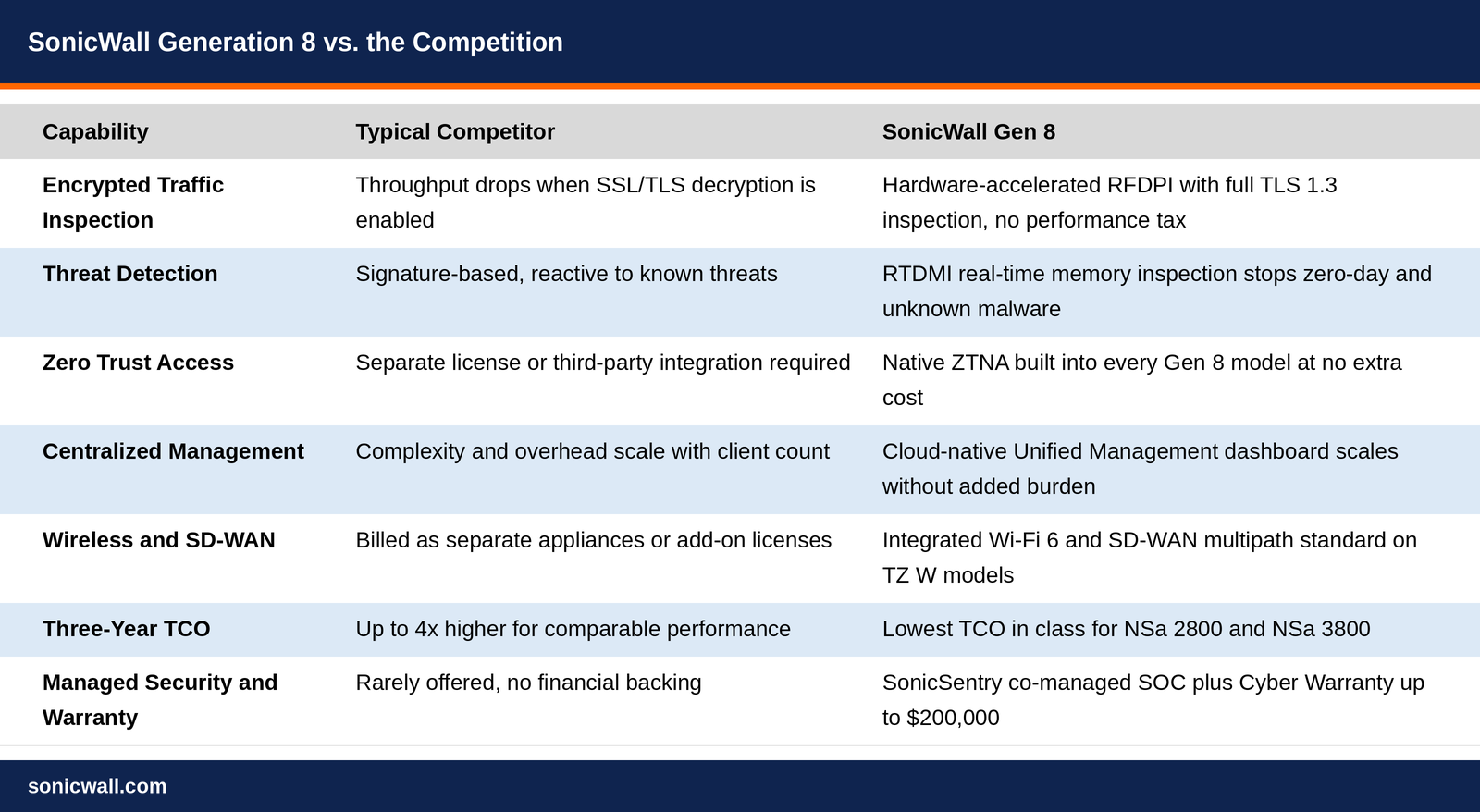
The table below summarizes how Gen 8's approach compares to the typical competitive posture across the capabilities that matter most to buyers.


Gen8_vs_Competition_SonicWall_1.png

Figure 1: SonicWall Gen 8 vs. the Competition

SonicSentry and the Cyber Warranty: Industry Firsts

Two Gen 8 features deserve special recognition because no other major firewall vendor offers anything comparable.

SonicSentry Co-Managed Security provides around-the-clock monitoring and maintenance by SonicWall's own security experts, optionally bundled with the platform. For organizations that need 24/7 SOC coverage but cannot staff it internally, this is a compelling managed service that sits directly alongside the hardware and software they already own.

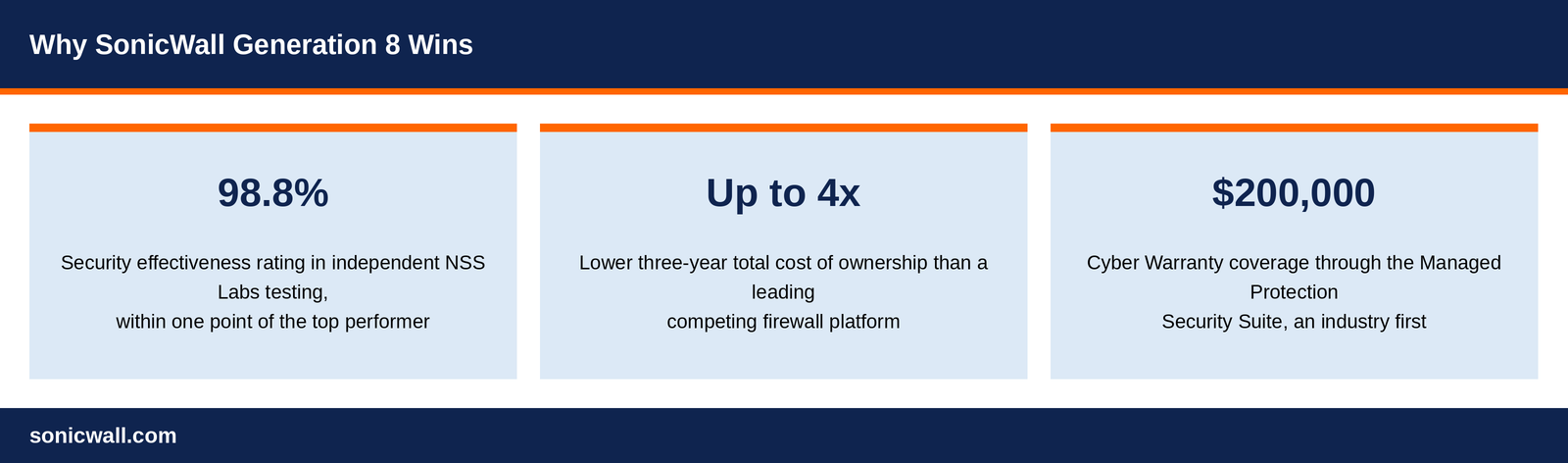
The Cyber Warranty, delivered through the Managed Protection Security Suite (MPSS), provides up to $200,000 in financial coverage for certain cyberattacks. This is an industry first. It signals something important: SonicWall is willing to stand behind the effectiveness of its platform with real financial accountability, not just marketing SLAs.


Gen8_Why_It_Wins_SonicWall.png

Figure 2: Why SonicWall Gen 8 Wins

The Verdict

SonicWall Gen 8 outperforms the competition not because it has the most impressive spec sheet in every single category. It outperforms because it delivers the right combination of capabilities, including raw performance, advanced threat intelligence, native Zero Trust, cloud-native management, and integrated wireless and SD-WAN, at a total cost that makes the business case undeniable.

For MSPs scaling security operations across many clients, it offers operational leverage that the competition simply cannot match at equivalent price points. For enterprises weighing a firewall refresh, it delivers threat prevention effectiveness that rivals premium vendors without the premium price tag.

The conversation around network security has evolved. It is no longer sufficient to buy a fast firewall and hope the rest works out. Gen 8 is SonicWall's answer to that evolution: a fully integrated, outcomes-focused security platform designed for the threats and networks of today, not the architectures of a decade ago.


SonicWall Gen 8: Performance Without Compromise
Gen 8 delivers hardware-accelerated inspection, native Zero Trust, cloud-native management, and an industry-first Cyber Warranty, all at a total cost of ownership competitors cannot match.

Contact your SonicWall representative or partner today to discuss how Generation 8 compares for your environment


Frequently Asked Questions

QuestionAnswer
Why does SonicWall Gen 8 outperform competing firewalls?Gen 8 combines hardware-accelerated performance, RTDMI real-time threat detection, native Zero Trust Network Access, cloud-native management, and integrated Wi-Fi 6 and SD-WAN, all delivered at a total cost of ownership that undercuts comparable competitive platforms.
What is RTDMI and how does it improve threat detection?Real-Time Deep Memory Inspection (RTDMI) inspects files directly in memory as they execute, allowing Gen 8 firewalls to identify and block zero-day exploits and unknown malware that signature-based detection would miss.
Does SonicWall Gen 8 include Zero Trust Network Access out of the box?Yes. Every Gen 8 model, from the TZ80 to the NSa 6800, enforces identity-based access policies natively, with no separate license, appliance, or professional services engagement required.
How does Gen 8's total cost of ownership compare to competitors?An independent three-year TCO analysis found a leading competing platform costs nearly four times more than an equivalent SonicWall deployment. The NSa 2800 and NSa 3800 carry the lowest TCO in their performance class.
What is the SonicWall Cyber Warranty?Delivered through the Managed Protection Security Suite (MPSS), the Cyber Warranty provides up to $200,000 in financial coverage for certain cyberattacks, an industry first among major firewall vendors.


SonicWall Re-introduce Essential Protection Security Suite (EPSS)

06/08/2026
by Admin Admin

For some reason (we don't understand) SonicWall have re-introduced the Essential Protection Security Suite (EPSS) bundle to more products. For the first time, Gen 8 models are included as well.

The Advanced Protection Security Suite (APSS) still remains the minimum we recommend as it includes more security, and greater reporting through the SaaS NSM portal.

SonicOS 8.0 Version 8.2.2-8015 Released

04/08/2026
by Admin Admin

SonicOS 8 - Release Notes

These release notes provide information about the SonicWall SonicOS 8 release.

Version Overview

SonicOS 8.2.x Version

Release Description:
Version 8.2.2 is a feature release built on top of SonicOS 8.0.0, 8.0.1, 8.0.2, 8.0.3, 8.0.4, 8.1.0, 8.2.0, and 8.2.1
Upgrade path: Anyone operating on SonicOS 8.0.0, 8.0.1, 8.0.2, 8.0.3, 8.0.4, 8.1.0, 8.2.0, and 8.2.1 should upgrade to SonicOS 8.2.2 to take advantage of the new features and fixes.


CAUTION: Downgrading from 8.2.2 to any prior firmware version is not supported. Downgrading could result in the deletion of all LDAP users and a complete reset of all MFA settings. If a downgrade is required, all LDAP users and MFA configurations must be manually reconfigured afterward. A full configuration backup is strongly recommended before upgrading.

SonicOS 8.2.x Version — Version 8.2.2-8015

July 2026

Compatibility and Installation Notes

  • Most popular browsers are supported, but Google Chrome is preferred for the real-time graphics display on the Dashboard.
  • A MySonicWall account is required.

Important

  • The TZ80:
    • Must be licensed before it can be configured or used.
    • Must always be connected to the Internet. It cannot be used in a closed network environment.
  • Beginning with SonicOS 8.0.0, these SonicPoint devices are no longer supported:
    • SonicPoint-N
    • SonicPoint-NDR
    • SonicPoint-Ni/Ne
    • SonicPoint-ACe/ACi/N2
  • Support for the WEP and TKIP security protocols has been deprecated.
  • Support for the Radio Role > Mesh Gateway has been deprecated in the TZ wireless models.
  • Settings from Gen 7 firewalls running SonicOS 7.3.x can be imported into Gen 8 firewalls operating on SonicOS 8.2.2 version.
  • All features introduced in SonicOS 7.3.3 are available in SonicOS 8.2.2.


The platform-specific version for this unified release is the same:

TZ Series Firmware Version NSa Series Firmware Version NSv Series Firmware Version
TZ80 8.2.2-8015 NSa 2800 8.2.2-8015 NSv XS 8.2.2-8015
TZ280 8.2.2-8015 NSa 3800 8.2.2-8015 NSv S 8.2.2-8015
TZ280P 8.2.2-8015 NSa 4800 8.2.2-8015 NSv M 8.2.2-8015
TZ280W 8.2.2-8015 NSa 5800 8.2.2-8015 NSv L 8.2.2-8015
TZ380 8.2.2-8015 NSa 6800 8.2.2-8015
TZ380W 8.2.2-8015
TZ480 8.2.2-8015
TZ580 8.2.2-8015
TZ680 8.2.2-8015

Deprecation Notice

Support for customizing guest login pages using external web servers with the CGI mechanism has been deprecated. This functionality will no longer be enhanced, and customers are advised to migrate to the supported API-based guest login customization mechanism.

For migration guidance and additional details, refer to the following Knowledge Base article: Deprecation of CGI-Based Guest Login Page Customization.

What's New

  • Security Services Enabled by Default — Gateway Anti-Virus, Anti-Spyware, Intrusion Prevention, Botnet Filtering, and Geo-IP Filtering are automatically enabled on SonicOS 8 appliances at the point of registration, without requiring post-deployment configuration.
  • Let’s Encrypt Integration — SonicOS 8.2.2 now supports the ACME v2 protocol for automated issuance, renewal, and installation of SSL/TLS certificates directly from the firewall.
    • Supports HTTP-01 domain validation.
    • Certificates are renewed automatically ahead of expiry.
    • Configurable from both the SonicOS management UI and CLI.
  • Two-Factor Authentication for GVC — TOTP-based two-factor authentication is now available for Global VPN Client (GVC) connections.
  • Indicator of Compromise (IoC) – Hash Detection — Administrators can import MD5, SHA-1, and SHA-256 hash lists from threat intelligence feeds (up to 500,000 entries). Files matching an imported hash are blocked in transit and logged for audit purposes.
  • Non-Reversible Password Storage — Stored credentials now use one-way cryptographic hashing (bcrypt) rather than a reversible format. Existing credentials are automatically migrated during the first login after the upgrade, and configuration exports no longer contain recoverable credentials. This feature is not enabled by default.
  • SD-WAN Site Support Increase — The maximum number of supported SD-WAN sites per SonicOS 8 appliance has increased, extending single-hub SD-WAN coverage for larger branch deployments.
  • SonicOS UI/UX Improvements — This release includes a consolidated set of usability improvements across rule and policy pages, App Control, VPN monitoring, and logging, aligned with updated NSM 4.3 terminology:
    • Redesigned change-notification banner, repositioned so it no longer blocks key workflow actions.
    • Standardized placement of Add, Edit, Delete, Move, and Clone controls across Access Rules, NAT Rules, Route Rules, DNS Rules, Content Filter Rules, and App Rules.
    • Create Another option added for NAT, Route, DNS, Content Filter, and App Rules.
    • App Control list now sorts by Category Name, then App Name, then Signature ID, with the selected category persisting across changes.
    • VPN tunnel status now updates in real time.
    • ACL/NAT live counters no longer force a full grid reload or lose the last-hit timestamp.
    • Log entries now link directly to the related App Control, IPS, or Anti-Spyware signature settings.
    • LLDP now supports both transmit (Tx) and receive (Rx).
    • The Network > System > Interfaces page supports ascending and descending sort, with sub-interfaces sorted within their parent.
  • SonicOS 8 NSv Small / Medium / Large — Three new SonicOS 8 NSv virtual firewall sizes are introduced: Small (2 vCPU / 2 GB), Medium (4 vCPU / 8 GB), and Large (8 vCPU / 16 GB), supporting VMware, KVM, Hyper-V, Proxmox, AWS, and Azure. The maximum supported number of groups per NSv instance has increased to 500.
  • NSM Enhancements — SonicOS 8.2.2 is a co-release with NSM 4.3, which includes the following firewall-side capabilities:
    • Source and destination MAC addresses are now captured for user-based system events, including sessions established via SSL VPN or GVC remote access clients.
    • Firewall audit log data can now be delivered to NSM as flow events via a new IPFIX template.
  • User Management Enhancements — Guest Wi-Fi now supports a branded captive portal experience with Acceptable Use Policy (AUP) enforcement. RADIUS attribute support has been extended for advanced identity provider and access management integrations.
  • Platform Capacity Increases — The following per-platform limits have been increased in this release:
    • TZ80: maximum concurrent SSL VPN users increased to 10.
    • NSv L Model: maximum supported groups increased to 500.

This release also resolves previously reported issues.

Resolved Issues

Issue ID Description
GEN8-14363 Host header injection vulnerability in SonicOS (CVSS 4.3 - Medium).
GEN8-15431 SD-WAN load balancing does not occur when the SLA strategy is set to Lowest Cost with the LB type set to Ratio.
GEN8-15723 Unable to pass traffic over a LAG member when its LAG Agg is disabled on NSa 2800.
GEN8-16196 NSa 3800 intermittently reports false fan failure alerts.
GEN8-16283 The tooltip on the Geo-IP Filter Settings page was too narrow to display its full text.
GEN8-16355 An error pops up when opening an SSH terminal session in the GUI using the Firefox browser.
GEN8-16421 Bandwidth management parameters under access rules display an incorrect value.
GEN8-16558 Sometimes the auto-download of IoC files still occurs even when file auto-download is disabled.
GEN8-16603 SSL VPN UDP packets are dropped on NSa 2800.
GEN8-16711 The GUI displayed IPv6 traffic under the IPv4 traffic view.
GEN8-16932 SSL VPN users are unable to connect when SYN Flood Protection Mode is set to Always Proxy WAN Client Connections on firmware 8.1.0, 8.2.0, and 8.2.1.
GEN8-17108 The firewall drops Cloud Secure Edge (CSE) egress traffic as “Destination IP unreachable” on NSa 4800.
GEN8-17115 After a factory default, navigating to the Access Rules page and downloading a TSR shows “Licensing must be activated for this feature”.

Known Issues

Issue ID Description
GEN8-2677 The user is not logged out from the firewall even after the inactivity time is reached.
GEN8-10895 On NSa 6800, a 40G Twinax connection shows no link when the port is set to auto-negotiation; it works only in 40G force mode with Cisco.
GEN8-11359 NSa 4800 intermittently does not detect SFP modules when 10GBASE-T type SFPs are frequently plugged and unplugged.
GEN8-15639 An NSv firewall drops Cloud Secure Edge (CSE) client traffic after a fresh deployment; traffic works only after a firewall reboot.
GEN8-16066 Hashed passwords break the CLDAP periodic check functionality.
GEN8-16864 Admin/user IP lockout does not work for NSv S/M/L on AWS Pay-As-You-Go with UPE/Policy mode; it works on hardware platforms.
GEN8-17572 On NSa 2800, traffic fails after a reboot or restart when the X0 LAG Aggregator is disabled.
GEN8-17959 The “No space available on device” error appears during firmware upload when ZTv3 debug logging is enabled and set to level 13.
GEN8-17990 When storing user passwords non-reversibly is enabled, a new user's password is stored non-reversibly even when the user's group memberships specify that it should be stored reversibly.
GEN8-18136 TACACS user authentication fails when the user logs in with a domain name for the SSL VPN portal.
GEN8-18145 On the System Monitor Real-Time Charts, Interface Usage data is not displayed consistently.
GEN8-18167 Botnet Filtering is automatically enabled after upgrading from 8.2.1 to 8.2.2, even if it was disabled in 8.2.1.
GEN8-18178 On an NSa 6800 HA pair, saving an SSL VPN-to-LAN access rule on a sub-interface with Allow Management Traffic enabled (Optional Settings > Others) returns an error.
GEN8-18187 The Test Email function for SFR mailing returns an “API not found” error.
GEN8-18311 On an NSv firewall, vMotion cannot be enabled from the diagnostics page.
GEN8-18376 A raw API error appears when performing a global search.

Additional References

GEN8-16053, GEN8-16192, GEN8-16222, GEN8-16270, GEN8-16281, GEN8-16357, GEN8-16382, GEN8-16406, GEN8-16424, GEN8-16446, GEN8-16605, GEN8-16608, GEN8-16615, GEN8-16625, GEN8-16650, GEN8-16707, GEN8-16865, GEN8-16916, GEN8-16970, GEN8-16997, GEN8-17149, GEN8-17256, GEN8-17493, GEN8-17546, GEN8-17734


SonicProtect

01/08/2026
by Admin Admin

We have recently removed all the SonicWall SonicProtect subscriptions and hardware (read about the 'promo' here).

It is so much better value to but a Secure Upgrade promotion, and you aren't stuck with having to upgrade to the same model in the range. For example, if upgrading a TZ400, with SonicProtect you would be forced to buy the TZ480 (at an increased price over the same Secure Upgrade model). Also, with Secure Upgrade you could move from the TZ400 to another model in the Gen 8 range like the TZ380 or TZ580 if your needs have changed.

If you need to have a quote (to show), then drop us a message.

6 Reasons to Choose Cloud Secure Edge

27/07/2026
by Admin Admin

Common Use Cases

Like any enterprise business, SMBs are leveraging cloud, mobile, and distributed workforce for performance, cost or competitive advantage. However, this shift also heightens their risk exposure, and cybercriminals are aware of it. Hackers target SMBs due to their limited cybersecurity expertise, resource imitations and budgets, making them vulnerable to attacks. This underscores the need for SMBs to take the first but important step of securing the user access to applications on-and off-cloud

SonicWall Cloud Secure Edge (CSE) is a highly effective and easily adopted security solution, enabling users to access any resource from any device securely. It delivers simple, secure ‘zero trust’ access to private and internet resources for all your employees and 3rd parties, regardless of their location. CSE combines the functionality of multiple traditional network appliances – remote access VPN, web proxy, firewall and more – into a unified cloud solution, improving the security posture and user experience for the entire user base.

CSE can help you secure your users, applications, and business by ensuring the right user is accessing the right application irrespective of their location. Here are the 6 use cases CSE helps you tackle:

1. Protect your Network

CSE’s Cloud VPN (aka VPNaaS) works seamlessly with IaaS and PaaS environments providing one-click access to corporate applications as well as resources like SSH/RDP servers.
You no longer need to purchase, install, configure, and manage VPN software and hardware on each device or location. Instead, you can simply connect to CSE via the internet and enjoy a cost-effective, fast, secure, and reliable Cloud VPN connection.
Capacity can be quickly and easily scaled up or down according to need, without having to purchase or deploy additional hardware or software. Best suited to securely connect remote users or branch offices to your network resources.

2. Protect User and Data from Web and Internet Threats

Do you use applications like Microsoft 365, Zoom, Google Workspace, and even YouTube to get things done? CSE protects users from being phished, straying onto malicious websites, and being exposed to malware attacks.
All needed functionality is built right into the lightweight CSE app. Protection is afforded even if the user hasn’t logged in!

3. Allow Business-only SaaS Applications

Achieve robust, consistent SaaS application security with CSE.
CSE provides visibility into all cloud applications being used as well as their risk level and usage patterns. It further helps in monitoring and reporting compliance with various regulations, making it easier for the institutions to ensure their compliance status.

4. Protect Access based on Roles

CSE provides comprehensive, zero-trust access to on-prem, hybrid, and multi-cloud infrastructure and applications – from anywhere.
Least-privilege access ensures users only have access to the resources they need to do their jobs. CSE Seamlessly integrates with existing Identity Provider (IdP), Endpoint Detection and Response (EDR), and Unified Endpoint Management (UEM) tools.

5. Prevent Device Compromise with Posture Assessment

CSE’s Device Trust ensures end users only access applications, data, and services from known trusted devices.
CSE is a device-based ZTNA solution, meaning it ensures that devices meet the minimum security requirements before being allowed to access corporate resources. This includes ensuring that devices have the latest security updates and patches, that they have anti-virus software installed, and that they are not jailbroken or rooted.

6. Modernize your existing VPN solution

SonicWall customers can leverage CSE Connector integration within their Gen7 fiewealls, enabling Zero Trust Network Access to their private apps hosted behind the firewall. With ZTNA you get a granular security approach, ensuring that user and device trust are repeatedly verified before granting access to specific applications, regardless of location and endpoint type.
CSE can run alongside existing VPN if desired, allowing low-risk incremental deployment by application or user group, retaining safety net of existing legacy services.


Upcoming Price Adjustments - Effective 1st August 2026

17/07/2026
by Admin Admin

SonicWall is adjusting pricing on select SKUs effective August 1, 2026.

We recognize that pricing changes impact your business and your clients, and this decision was not made lightly. Our goal is to continue providing industry‑leading cybersecurity solutions while investing in the technologies, services and support that help drive long-term success for our partners.

To support you through this transition, we are providing a clear planning window ahead of these changes, giving you the time and visibility needed to align internally and with your customers before the updated pricing goes into effect.

Here is what is changing, what is not, and what you can do before the deadline.

What is NOT Changing

  • TZ Gen 7 and Gen 8 bare hardware and 1-year bundles
  • EPSS term subscriptions (Gen 7)
  • MPSS term subscriptions (Gen 7, Gen 8 TZ, Gen 8 NSa)

What IS changing (effective August 1, 2026)

  • Gen 8 NSa hardware and bundles: up to 10%
  • Multi-year subscription bundles (3&Free, Secure Upgrade): up to 10%
  • APSS subscriptions, Gen 7 and Gen 8: up to 10%
  • MPSS Monthly Billing (SPP): up to 11%
  • Other subscriptions via Monthly Billing (SPP): up to 15%
  • NSM Basic and Advanced: up to 15%
  • A la carte security subscriptions: up to 20%
  • Support subscriptions (24x7, 8x5): up to 20%

Why are Prices Changing

Sustained increases in component, logistics, and cloud delivery costs, combined with continued investment in Gen 8, AI-powered threat intelligence, and unified management.

Your Window

All current quotes are honored through July 31, 2026. If you have renewals or open opportunities, placing them before August 1 locks in current pricing. Multi-year bundles are at the lower end of these adjustments and is worth a conversation with customers if the timing works.

End of Life Announcement: SonicWall Email Security

02/04/2026
by Admin Admin

Overview

‌SonicWall is initiating the End of Life of the Email Security products – Email Security Software, Email Security Appliances (all physical and virtual models) as well as Hosted Email Security. Key dates for this process are as follows:

  • Last Order Day: April 30, 2026
  • End of Sale and Limited Retirement Mode Begin: May 1, 2026
  • End of Support: May 1, 2027

‌For more information about Product Lifecycle phases, please visit Product Lifecycle.

Frequently Asked Questions

  1. Why is SonicWall initiating this process now?
    Over the last 3 years, there has been an explosion of growth in the use of cloud-based email services, led by Microsoft Office 365 and Google Workspace. The traditional Security Email Gateway (SEG) technology leveraged by SonicWall Email Security served its purpose for on-premise Email services but has now become obsolete.
  2. Does this mean that SonicWall will no longer offer Email Security products?
    We have an existing partnership with Avanan (now part of Check Point), a market-leading provider of cloud-based Email Security and we will continue to offer their products. However, we will no longer offer email security solutions for on-premise email deployments.
  3. What are the recommendations for current customers of Email Security?
    SonicWall highly recommends migrating to cloud-based email for long-term scalability and resilience. This will require either migrating email infrastructure to a Microsoft 365 deployment running entirely in the cloud or running as a hybrid cloud environment. With either of these deployment options, we offer the Avanan solution for maximum protection.
  4. What happens to Email Security products that have licenses due to expire after the End of Support date?
    After May 1, 2027 (End of Support), customers still running deployments of the Email Security appliances/virtual appliances/software will no longer receive technical support, firmware updates/upgrades, or replacements for the product, and all remaining unique inventory or materials will become unavailable.
    The SonicWall Hosted Email Security Service will be shut down on May 2nd 2027 and will no longer process any emails redirected to its servers.
    SonicWall is committed to making this transition as smooth as possible – stay tuned for further communications on options to transition away.
  5. What are the recommendations for a customer who wishes to continue using on-premises email?
    We recommend that all customers migrate their email services either entirely to cloud or run a hybrid cloud environment and take advantage of a modern cloud-based email security service. SonicWall will no longer sell email security based on legacy secure email gateways for on-premises only email services.

‌

Managed Protection Security Suite - Leave the firewall configuration to our experts.

31/03/2026
by Admin Admin

Firewalls need active management. With MPSS, our experts handle the management of your Generation 7 or 8 firewall, ensuring you always have the best firewall configuration to defend against cyber threats.

Read more here: /firewalls/managed-protection-security-suite.html

More information:

Getting Started with MPSS

MPSS Frequently Asked Questions (FAQs)


FIPS 140-3 Validation: The Difference Between Proven and Assumed

25/03/2026
by Admin Admin

By Georgy Thadathil (SonicWall Product Manager)

Overview

Cybersecurity is no longer just about blocking threats; it's about proving security works as intended, especially when auditors, regulators, or customers come asking. FIPS 140-3 validation plays a crucial role in delivering that assurance.

SonicWall's FIPS 140-3 Commitment

SonicWall firewalls incorporate FIPS 140-3-validated cryptographic modules, meeting the stringent security requirements demanded by government, defense, and regulated industry customers.

By achieving FIPS 140-3 validation, SonicWall demonstrates that:

  • Cryptography is implemented securely and according to federal standards
  • Products meet compliance expectations required for regulated procurement
  • Security claims are independently verified, not self-certified

This validation provides enterprises with assurance that SonicWall solutions are built on a strong technical and compliance foundation.

What Enterprises Gain from FIPS 140-3 Validation

1. Independently Verified Cryptographic Security

FIPS 140-3 validation ensures that encryption and authentication mechanisms are:

  • Correctly implemented according to cryptographic standards
  • Resistant to known weaknesses such as side-channel attacks
  • Independently tested by accredited laboratories, not self-certified by vendors

This reduces the risk of hidden implementation flaws that attackers could exploit.

Real-world context: Over the years, security researchers have discovered critical vulnerabilities in products that claimed "military-grade encryption" but had flawed key generation, weak random number generators, or improper memory handling. FIPS 140-3 validation helps prevent these issues from reaching production.

2. Simplified Compliance and Audit Success

Organizations operating under regulations such as:

  • Federal government security mandates (FedRAMP, FISMA, DoD)
  • Financial compliance frameworks (PCI-DSS, SOX, GLBA)
  • Healthcare regulations (HIPAA)
  • Critical infrastructure requirements (NERC CIP)

…often require or strongly prefer FIPS 140-3 validated products to pass audits.

Using FIPS 140-3 validated solutions simplifies:

Security audits and compliance reporting

  • Vendor risk assessments
  • Third-party security questionnaires
  • Regulatory documentation requirements

Bottom line: When auditors ask, "How do you know your encryption works?", you can point to an independent government validation.

3. Reduced Operational and Security Risk

Weak or incorrectly implemented cryptography can lead to:

  • Data breaches exposing sensitive customer or operational data
  • Compliance violations resulting in fines and legal liability
  • Loss of customer trust and competitive damage
  • Incident response costs and remediation expenses

FIPS 140-3 validation minimizes these risks by enforcing rigorous design, implementation, and testing standards before products reach customers.

4. Future-Proof Security Architecture

Security standards and threats evolve continuously. Products designed with FIPS 140-3 discipline are typically:

  • Built with modular, standards-based cryptography that can be upgraded
  • Easier to migrate as new algorithms and requirements emerge
  • Better positioned for post-quantum cryptography transitions
  • Aligned with long-term security roadmaps rather than short-term fixes

Choosing FIPS 140-3 validated products today means fewer disruptive replacements tomorrow.

5. Performance Without Compromise

A common concern is whether FIPS mode impacts performance.

Modern FIPS 140-3 validated implementations:

  • Leverage hardware acceleration for cryptographic operations
  • Maintain high throughput for VPN, SSL/TLS, and encrypted traffic
  • Use optimized algorithms that balance security and speed

With SonicWall firewalls, FIPS mode can be enabled without significant performance degradation, ensuring security doesn't come at the cost of user experience.

Where FIPS 140-3 Matters in Real Deployments

Whether securing:

  • Enterprise perimeter networks with next-generation firewalls
  • Remote access VPNs for hybrid and distributed workforces
  • Cloud workloads with virtual security appliances
  • Service provider infrastructure supporting government or regulated customers
  • Critical operational technology (OT)in industrial environments

...FIPS 140-3 validated solutions provide confidence that security controls will behave reliably, even under attack, stress, or error conditions.

Deploying SonicWall in FIPS Mode

SonicWall firewalls make FIPS 140-3 compliance straightforward:

  • Enable FIPS mode through the management interface
  • Configure approved algorithms for VPN and encryption
  • Verify operation using built-in diagnostics
  • Document configuration for audit and compliance purposes

SonicWall's management tools provide visibility into FIPS status, making it easy to maintain compliance over time.

Security That is Proven

For enterprises, FIPS 140-3 validation means peace of mind. It ensures that the cryptographic security protecting critical data and operations is not just claimed by marketing teams but independently validated by experts.

When the stakes are high and compliance matters, FIPS 140-3 is the difference between "we think we're secure" and "we can prove we're secure."

Resources:

  • Verify FIPS validations: Search the NIST CMVP database
  • Learn more: Contact your SonicWall representative for FIPS-specific documentation and deployment guides
  • Need help? SonicWall support and professional services can assist with FIPS mode configuration and compliance requirements